For a while, nobody questioned it.
Every afternoon, across 3-4 team members, the same ritual played out. Log into each Xiaohongshu (Little Red Book) creator account, wait for yesterday’s data to appear in the Creator Centre dashboard, and copy numbers into spreadsheets. Field by field. Account by account. Twenty-plus clients at about 15 minutes each. Add it all up and you get roughly 5 hours of manual data collection across the team, every day, including weekends.
Xiaohongshu has no public API and no data export. The dashboard only shows yesterday’s numbers after a fixed update time. If you missed a day, maybe because you were sick or it was a busy Friday, that data was gone. You’d have a gap in the client’s report, and there was nothing you could do about it.
This was at a marketing agency in Singapore where I worked for 7+ years. Part of my role was looking at how the team worked and finding ways to make things smoother. But this particular problem didn’t announce itself. It was just how things were done.
Seeing it
The team never complained about it directly. They complained about busy days, about not having enough time, about reports being tedious. But nobody said “this 5-hour daily data collection process is broken,” because it wasn’t broken. It worked. It was just slow, repetitive, and completely manual.
It showed up in small things. Someone mentioned they forgot to grab yesterday’s data. Someone else had a typo that threw off a client report. A new team member asked why the spreadsheet had blank rows for certain dates. Once, someone flagged that the numbers in a client report didn’t add up, and after digging into it, the problem wasn’t the data at all, it was a broken formula in the spreadsheet that nobody had noticed.
None of these felt like a big deal on their own. But the pattern was clear. The process depended entirely on people remembering to do it perfectly, every single day.
That’s when I started poking around in the browser’s developer tools. Not because I had a plan, just out of curiosity. And I found something that was obvious in hindsight. The Creator Centre dashboard was loading its data through regular web requests, and the responses came back as clean, structured JSON. Every field the team was copying by hand, like followers, engagement, and content performance, was all there, already organised, in the network tab.
The data wasn’t hidden. It was just trapped behind a UI that only let you look at it, not take it with you.
The first version nobody talks about
The first version was a Golang CLI tool. You’d grab your session cookies from the browser, paste them into the tool, and it would fetch the data from those same API endpoints the dashboard used. No scraping. No reverse-engineering some protected system. Just calling the same URLs the browser was already calling, with valid authentication.
The team could use it after a quick walkthrough, and for a while, it was fine.
Quick to build, met our minimum requirements, improved overall efficiency. That was the philosophy, and I still think it’s the right one. You don’t need a polished product to solve a real problem. You need something that works today, so you can learn what it actually needs to become tomorrow.
But “for a while” is the key phrase here.
The problem behind the problem
As the team grew, a new pattern showed up. Cookies expire. Not on a predictable schedule, sometimes after hours, sometimes after days. When it happened, the team member would need to open the browser, grab fresh cookies, and paste them back into the CLI.
This doesn’t sound like a big deal. But here’s the thing about tasks you only do once every few weeks: people forget how to do them. The first time someone set up the cookie workflow, they got a walkthrough and it made sense. Two weeks later, when cookies expired without warning, they’d forgotten the steps. They’d ask me. I’d walk them through it again. Next time it expired, same thing.
I realised the actual problem wasn’t technical, it was behavioural. The tool assumed people would remember a multi-step process they only needed once every few weeks, and that’s not how people work. Especially people whose job is marketing, not debugging terminal commands.
The question wasn’t “how do I make the CLI easier to use?” It was “how do I remove the thing that keeps breaking?”
Chrome Extension: removing the friction
A Chrome Extension rides on the browser’s existing session. If you’re logged into Xiaohongshu in your browser, the extension can make authenticated requests using those same session cookies, automatically. No copying, no pasting, no terminal, no expiry to worry about.
Install once. Click to collect.
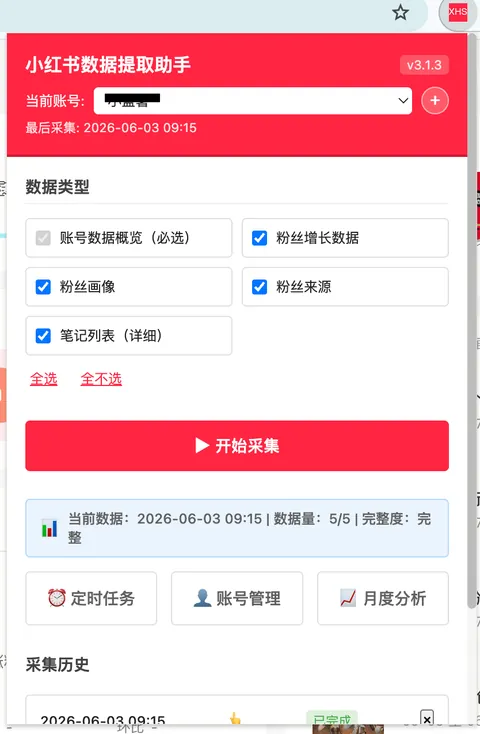
The extension directly calls the same API endpoints the Creator Centre dashboard uses. It fetches from five different endpoints covering overview metrics, follower growth, audience demographics, traffic sources, and top-performing content. The data comes back structured, gets normalised, and is stored locally per account.
Technically, this was not complicated. The hard part was everything that came before, which was noticing that the CLI’s real failure wasn’t in code quality but in human memory.
Then they needed more
Once the data collection was automatic, a new bottleneck became visible. The old workflow went like this: collect data, paste into Google Sheets, manually create charts in Sheets, copy charts into client report documents. The collection step was gone, but the rest of the pipeline was still manual.
So I added Chart.js visualisations directly into the extension. Eleven interactive charts covering monthly trends, audience breakdowns, and content performance. Then a PDF export, a proper monthly report that a team member could generate and hand to a client in a few clicks.
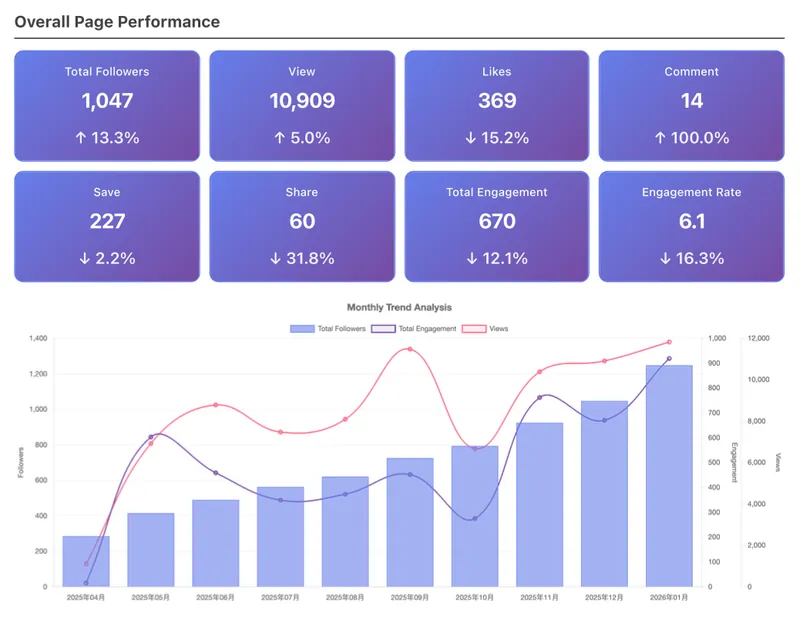
Around this time, Xiaohongshu actually added their own export feature. But it only covered part of what the team needed. Without the extension, you’d still have to go to different pages to export different types of data, and some metrics could only be captured through screenshots. The extension handled all of that in one click.
What actually changed
Roughly 5 hours of daily manual work eliminated across the team. Client-ready reports that used to take 30+ minutes of manual chart-building now took a few clicks. Zero data gaps because collection was scheduled and automatic, so no more “I forgot it was a long weekend.”
But the thing I think about more is this. Before the tool, new team members would spend their first few weeks just learning the manual data collection routine. It was something nobody questioned. After the tool, a new person could install the extension and generate their first client report on day one.
The process went from “something you need to be trained on” to “something that just works in the background.”
What the code didn’t teach me
If I wrote this as a technical article, it would be short. Find the API endpoints, call them with valid cookies, normalise the responses, render some charts. The code is straightforward. None of it required clever algorithms or complex architecture.
The parts that actually mattered were all non-technical.
Noticing the problem was the first one. The team had been doing this for a long time before I got involved. It was invisible precisely because it was routine. Nobody flags “the thing we do every day” as a problem. You only see it when you step back and watch how time is actually being spent.
Understanding the real friction was the second. The Golang CLI worked perfectly as software. It failed because it assumed people would remember infrequent maintenance tasks. The fix wasn’t better documentation or error messages. It was eliminating the maintenance task entirely.
Then there was designing for how people actually behave. Not how they should behave, and not how they behaved during the onboarding session when everything was fresh. How they behave three weeks later on a busy Friday afternoon when the cookies expire and they have five other things to do.
And finally, knowing when to keep going. The first version solved the collection problem. But stopping there would have just moved the bottleneck downstream. Each iteration, from CLI to extension, extension to visualisations, visualisations to PDF reports, came from watching what the team did next after the previous pain point was removed.
What I’d do differently
I should be honest about something. This tool was never properly planned. I was juggling other projects at the time and just squeezed in work on it wherever I could, doing whatever felt most urgent in whatever time I had. It was reactive, not deliberate.
And it worked. Even a scrappy, unplanned tool can make a real difference when it solves a genuine problem. But I also know that if I’d sat down and planned this properly from the start, I could have built it into something much more capable. There were features I never got around to adding, edge cases I patched instead of prevented, and design choices I made in a rush that I had to live with later.
The honest takeaway is that you don’t need a perfect plan to start making things better. But a lack of planning does put a ceiling on how far you can take it.
The quiet lesson
There’s a tendency, especially among developers, to see automation as a coding problem. You spot a repetitive task, you write a script, you move on. But the hardest automation problems aren’t about code at all. They’re about observation, about noticing that something even is a problem when everyone around you has accepted it as normal.
Start from the foundation, then improve step by step. That’s my approach to most things. The foundation here wasn’t the first line of code. It was the afternoon I sat next to the team and watched them work.